


You can now register your Sensaphone online!
Some Sensaphone products require a subscription to function or to access premium features of that device. During the subscription registration process, you'll be asked to identify your Sensaphone via a serial number. Finding the serial number can be tricky if you don't know where to look. The serial number is a twelve digit code broken up into six, two digit sections that are separated by a semi colon. For example, it might look something like this: 00:07:F9:A1:B2:C3.
The serial numbers can be found printed on a sticker. On the Sentinel, Stratus EMS and Sentry devices, they're placed on the back of the device. If those devices are placed in a weatherproof enclosure, you can find the sticker on the inside of the enclosure. Note the model number (e.g.: SCD-1200) is also included on the same sticker and can be disregarded for the registration process.
Find the serial number on a Sensaphone with a weatherproof enclosure
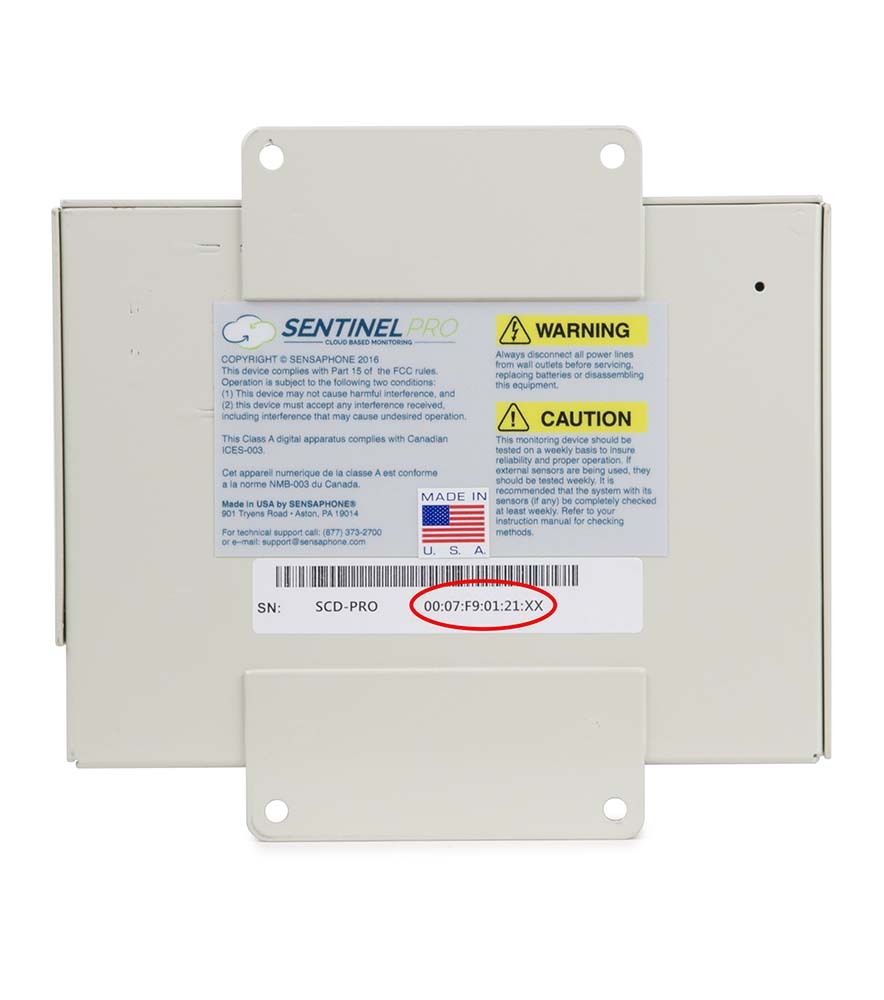
Find the serial number on a Sensaphone without a weatherproof enclosure
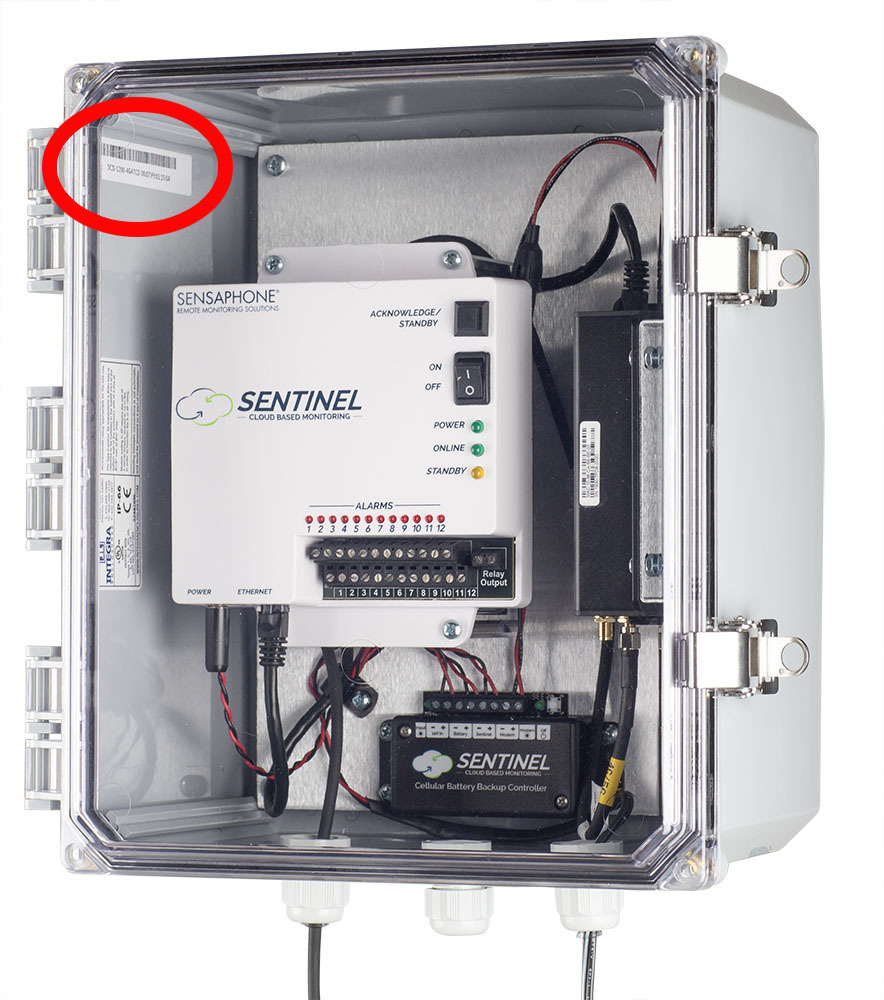
The serial number can be found on the inside of the weather proof enclosure. Afer the door is open look to the hinge side to find the serial number. The registration requires the twelve digit code broken up into six, two digit sections that are separated by a semi colon. For example, it might look something like this: 00:07:F9:A1:B2:C3.
The serial number can be found on the back of the device. The registration requires the twelve digit code broken up into six, two digit sections that are separated by a semi colon. For example, it might look something like this: 00:07:F9:A1:B2:C3.
Frequently asked questions:
What devices can I register online?
You can register Sensaphone Sentinel, Sentinel Pro, Stratus EMS and Sentry devices online. Both cellular and ethernet versions of the Sentinel and Sentinel Pro are available for online registration with a credit card. However, if you purchased an LTE Modem Accessory to use with an Ethernet Sentinel, Ethernet Sentinel PRO, or Ethernet Stratus EMS then you will not be able to register this online. Instead, you will have to submit the LTE Modem subscription form which came in the box with the modem to register@sensaphone.com. A copy of the form can also be found here.
Can I use the website to renew currently active devices or prepaid subscriptions?
Yes, the site can be used to renew existing subscriptions, prepaid subscriptions or newly activated subscriptions with a credit card. Please note that the billing date for all subscriptions registered online is the 15th of the month. Sensaphone is offering a $1 prorated discount that covers the time between when your current subscription ends and the new billing date starts on the 15th. Your credit card will be billed when your subscription auto-renews at the end of the prepaid term.
What payments will you accept?
The online site will only accept credit cards. If you need to pay with a purchase order or other form of payment, your subscription can be activated via a form that’s included in the box.
How long will the devices take to activate?
In most cases the subscription will become active within minutes. If there is a problem, you’ll receive an email to let you know.
What costs are associated with the subscription?
Sensaphone has changed the billing date to the 15th of the month for all renewing and new subscriptions. We are offering a prorated discount of a $1 per transaction to cover the time between when a currently registered subscription expires or from the date you register a new subscription to when the billing starts on the next 15 of the month. Multiple subscriptions can be added to the shopping cart to take advantage of the prorated discount. The fee is applied when the device is initially registered and will not apply when the subscription renews. .
Will subscriptions auto-renew?
Yes, both annual and monthly subscriptions will auto renew at the end of their term. Customers can cancel their subscriptions at any time.
How do I cancel my subscription?
Customers can log into their account, click on the blue “View Account” button, then select “Manage Subscriptions” from the top menu. Find the device you’d like to cancel and click “Cancel Subscription” at the bottom of the page.
Can I update my credit card?
Yes, once logged in click on the blue “View Account” button, select “Manage Subscriptions” from the top menu, then select “Payment methods” from the top menu again. Click on “Add Payment Button” then add your information.
Will there be a fee to reactivate my unit?
There is no additional fee to reacctivate. If your device has been cancelled, but you’d like to re-register, you'll just need to go through the re-registration process again.